Friday, March 5, 2021

Arrive Alive in Alamo

Not "The Alamo", that is in Texas.   We are in Alamo, NV.  Google it.  There is not much here.  We checked into Picket's RV which is the nicest RV place for over 160 miles (Unless you go to Vegas).  There are not many trees in the area but most of them are here at this RV place.  The trees are pretty bare this time of year making the place look a bit bleak.  The people here are all very nice.  When we arrived, 1st thing I noticed was that the internet did not work.  The manager said that he had not noticed and that I was first to mention it.  We fiddled around with it for a while and he decided that the router had died.  He dropped everything and drove over 100 miles to Vegas to buy a new router, then came back and fixed it all up.  It works great now with more speed than you would expect at an RV place.  Susie does not like our parking spot.  It is nothing great, close to other campers and very un-scenic.  It is exactly what I expected, but it is the only place around unless you want to boondock and we don't want to do that.  

The town of Alamo is small and dusty with lots of rocks and almost no grass.  If you lived here you would not have to worry about mowing your lawn.  Just about everyone owns a 4x4 quad vehicle.  After we settled in to camp, we headed down the road a grabbed a few caches.  I think we found 8, but then we only had an hours.  One of them was at the ET headquarters.  Quite a gift shop.

Thursday, March 4, 2021

Fire! Fire!

Long Lonely Road
We started the day with a bang.  I was trying to catch a few extra winks while Susie was banging around in the kitchen.  Suddenly, she starts hollerin, “Fire, Fire” and I see her juggling a ball of flame and throwing the silverware drawer into the sink.  I jumped out of bed, but she already had the fire out.  She had lit a match, it broke, and the flaming tip fell into the box of other matches in the drawer igniting them all.  After that excitement, we had our usual breakfast and headed out to Maverick to get some fuel.  McDonalds was next where we leached their wifi to do email and Marcos.  It was a long drive down some lonely roads to get to Tonopah.  We passed through Austin, NV  where the elevation is 7,450 feet.  There was a moderate amount of snow there but none on the road.  After fueling up in Tonopah we headed out to Saulsbury Wash Rest area to have dinner and hit the sack. 

Wednesday, March 3, 2021

On to Winnemucca

Water Canyon
We woke up this morning to an 18 degree nip in the air.  The Jeep started up with no problems but it did not like it very much and chugged a little for about 15 seconds.  That is a long time when you consider that it usually purrs like a kitten right off the bat.  We headed on into Burns, and did a brief tour of the town taking pictures of all the artwork that we found.  We stopped at 3 LFL’s and dropped off some more books. Next we dropped by the local Mc Donalds to sponge their wifi so we could check email and Susie could download her free puzzle for the day.  Finally we hit the road heading for  Winnemucca.  Believe me there is nothing much between Burns and Winnemucca.  Lots of open lonely  road.  We arrived at our campsite about 4:40, cranked the generator and had supper.  Yummy Dinty Moore canned stew!?  There were some ominous clouds overhead but by 7 they had moved off and left us with clear and starry skies.  It is very dark out.  We are camped up in the hills South of Winnemucca which lies in a valley.  We are at Water Canyon Camp Ground.  Above us there is a coating of snow and a lot of left over clumps of snow around us.  It will be a cold night but we have a heater.

Tuesday, March 2, 2021

ET Highway Adventure - Departing

Campsite at Chickahominey
We got off to a slow start.  Left Battle Ground at 11 AM which is about and hour late for us.  In Orchards, we stopped at a “Lirttle Free Library” (LFL) to exchange some books.  We mostly want to drop off some but it was pretty full. Traffic was light heading out of town on I84.  Taking the Wood Village exit, we headed for Mt. Hood.  There was a convenient Taco Bell in Sandy where we stopped to eat a fast lunch, then we continued our Journey toward the mountain.  There was lots of snow on Mt Hood, so much that you could not even see the ski area from the road.  Since is was was around 40 degrees, the roads were clear of snow and we did not encounter any ice.  We continued on to Madras were we got gas and stopped at two more LFL’s.  From there it was a short hop to Prineville and another LFL.  Finally we set our sights on Chickahominey Camp Ground near Burns.  We got here just after sun down with just enough light to crank up the generator.  To our surprise, there were two other RV campers here.  Last time we stayed here there was nobody.  Supper was Yakatori Chicken Rice  bowls with Almond milk and mixed nuts.  Yummy.  After supper I fiddled with the wireless thermometer and got it going again.  In the morning we can tell how cold it is outside.  I suspect it will be about 30.

Monday, February 15, 2021

Snow in Battle Ground

It snowed pretty good on Saturday.  We ended up with 10 inches when it was all done.  On Saturday afternoon, I picked up my grandson at work to give him a ride home.  Afterward, I was on my way home and I came across a guy with a Ford F150 stuck in the ditch.  I'm not to sure how he did that but his left rear tire was pretty deep and his front end was almost off the ground.  I pulled up along side, rolled down my window and said, "Looks like your stuck!"  I had a new towing strap under the seat that I have been itching to use so I offered my help.  He was a bit skeptical but agreed to hook it up to the front of his pickup while I attached the other end to my tow hitch.  He did not seem to think that my little ole Jeep could pull his big pickup out of the ditch.  I didn't tell him that I was packing a diesel under the hood.  He was just going to stand there and watch, but I told him he had to get in the truck and try to drive out while I pulled.  The road had 10 inches of snow and was mighty slippery but my Jeep 4x4 pulled him right out with very little effort!  He was grateful and a little more humble.

Tuesday, February 9, 2021

WD MyCloud Works with Linux

I decided to replace my old backup device with a new Western Digital MyCloud Duo.  I wanted to use it as a network backup device BUT, the directions say that it DOES NOT work with Linux.  It will work with just about everything else.  I am happy to say that it DOES work with Linux.  In fact it works good, but it is not plug and play.   You have to take steps to make it work.  Here is how to do it.  

I use MX Linux 19 which is Debian.  Other versions of Linux may vary but the principles are the same.  

1.  You must have cifs-utils installed in your system.
Open a terminal and type:  sudo apt install cifs-utils
You will have to enter your system password for this.

2. Next, you must make a "mount point" in your file system.  To do this, you must make a folder inside the "/media" folder of your file system.  You have to do this as a root user.  In MX Linux it is pretty easy.

Open File manager and click on "File System"

Scroll down and open the "/media" folder.

RIGHT click in the folder and select "Open Root Thunar Here"  (Thunar is the name of the file manager app.)

In the top menu, click on file then "Create Folder" and make a folder called "MyCloud".  You can use some other name if you like but keep it simple.  Exit the Root Thunar.  

Note:  A "mount point" is just a folder.  That's all.  There is nothing mystical about it, but you must have it.  Your "/media folder" may have some other stuff in it.  If so, leave it all alone and just make the folder.  Some Linux systems use "/mnt" instead of "/media".

3. Next, plug your new WD MyCloud into your router and turn it on.  Wait for it to spin up. You must now find out what the ip number of the MyCloud device is on your network.  I use "arp-scan" to do this.  If you do not have "arp-scan" you may need to first install it with package manager.  Then you can open a terminal and type:

sudo arp-scan --interface=wlan0 --localnet

This will show you a list of all devices on your network along with all their ip numbers.  On my network, the WD MyCloud is 192.168.0.113 yours will be different.  When you determine the ip number, write it down.

4. You must now make an entry in the special file "fstab" located in your /etc folder.  Use file manager to navigate to the "/etc" folder and find the file called "fstab".  RIGHT click on the "fstab" file and then select "Edit as Root".  You will have to type your password. Leave everything in the file alone but add a new line at the bottom like this.

//192.168.0.113/Public /media/MyCloud cifs guest,vers=1.0,uid=1000,iocharset=utf8 0 0

(The above is all one line.  It must be done correctly, letter perfect.)

Save the "fstab" file and exit the root editor.

5. Open a terminal and type  sudo mount -a

If all is correct, you should not get an error message and the MyCloud device should be mounted.  You can make lots folders and sub-folders. Use it as any other disk drive.  You can use the device for network attached storage. You can use your favorite backup app to backup to it, etc etc.  If you purchased the single unit rather than the Duo, the setup is the same.  The Duo unit gives you the extra protection of "RAID."

In the screen clip below, notice that MyCloud appears as a network drive on the left, the right window shows the contents so far.  Your iPads, iPhones, and Mac, will not show here.  They have their own setup.  If you also have a Windows computer, you can mount this device as a network drive and it will be included too.  In the example below, don't be confused by the word "Partition".  These are just folder names I chose to use for my own reasons.


Tuesday, February 2, 2021

What Really Happened in Genesis One

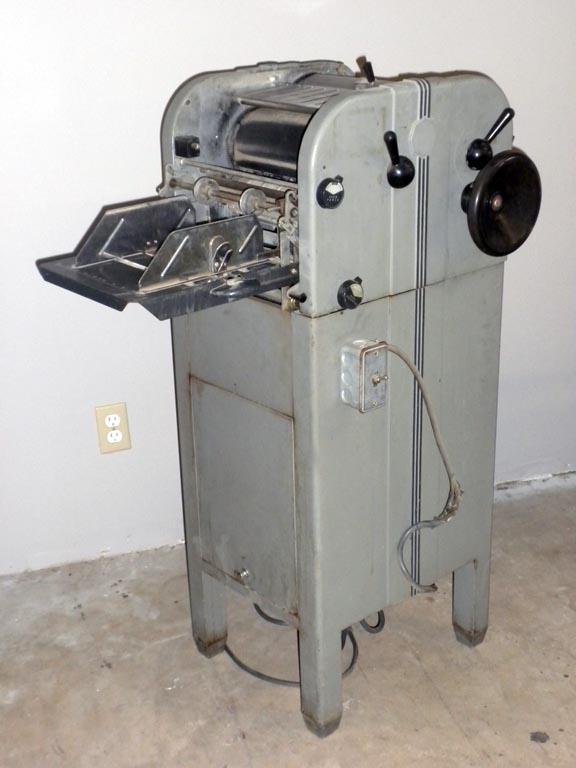
When I was doing my post-graduate studies at Florida Bible College, working on my ThB degree, I wrote a book as part of the required work.  I guess it was more of a thesis than a book but at the time I owned an offset printing press.  It was a Multilith Model 80.

  So, after typing the book on paper several times, I also typed it onto the thick paper printing plates that the press used.  Using these plates, I printed 100 copies of my book, bound them with staples, and distributed them to fellow students and friends.  

All of this was a very large task that I accomplished in one semester of work.  During that time I was taking 20 credit hours of school work, and working part time as a Medical Records Technician in a local hospital.  There were no computers.  All I had to work with was a wide carriage Remington typewriter, 3x5 cards, lots of paper and my printing press.  I look back on it now and wonder how I did it.  I was married too and must have driven my wife crazy with all the time I spent on this project.  She was a freshman student that year and also working part time as an RN at the hospital.

Years past and all of the copies of my book vanished, even my own copy.  Then one day a few years ago, an old friend sent me a package.  He said he was cleaning out his files and found a copy of my book and he thought I would like to have it.  He had kept it all those years.

I am re-typing it all now using LibreOffice Writer because it is too faded to scan and use OCR.  When I am done, I will probably post it here or maybe publish it on Kindle, who knows.  It is interesting to see the things that I wrote once again.


Thoughts with Morning Coffee

  T oday I woke up and as I had my morning coffee, I realized that everything is about to change. No matter how I vote, no matter what I say...